gource 命令详解
|
选择喜欢的代码风格
A B C D E F G H I J K L M N O P Q R S T U V W X Y Z
gource 命令是一个基于 OpenGL 的软件版本 3D 控制可视化工具,,用于源代码控制存储库。
gource 命令安装:
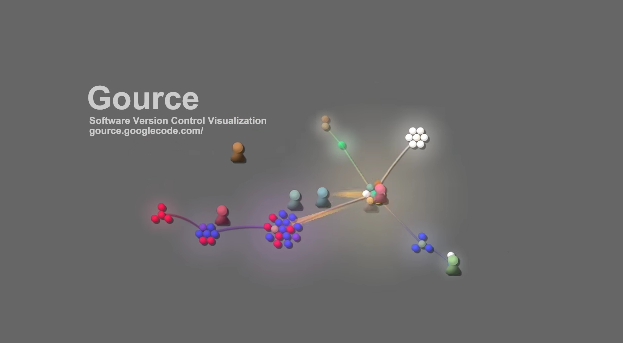
gource 命令生成动画 Tree 效果图
-bash/zsh: gource: command not found

#Debian
apt-get install gource

#Ubuntu
apt-get install gource

#Alpine
apk add gource

#Arch Linux
pacman -S gource

#Kali Linux
apt-get install gource

#Fedora
dnf install gource

#OS X
brew install gource

#Raspbian
apt-get install gource

#Windows
https://github.com/acaudwell/Gource/releases/download/gource-0.53/gource-0.53.win64-setup.exe
https://github.com/acaudwell/Gource/releases/download/gource-0.53/gource-0.53.win64.zip

#Docker
docker run cmd.cat/gource gource
gource 命令补充说明:
gource 呈现 Git、SVN、Mercurial 和 Bazaar 存储库的动画树图。它显示了随着时间的推移创建、修改或删除的文件和文件夹。
Gource 将软件项目显示为以项目根目录为中心的动画树。 目录显示为分支,文件显示为叶子。 可以看到开发人员在他们为项目做出贡献的时候在树上工作。
Gource 包括对 Git、Mercurial、Bazaar 和 SVN 的内置日志生成支持。 Gource 还可以解析由多个第三方工具为 CVS 存储库生成的日志。
gource 命令语法:
gource [options] [path]
gource 命令选项:
-h, --help
            Help ('-H' for extended help).

    -WIDTHxHEIGHT, --viewport WIDTHxHEIGHT
            Set the viewport size. If -f is also supplied, will attempt to set
            the video mode to this also. Add ! to make the window non-resizable.

    --screen SCREEN
            Set the number of the screen to display on.

    --high-dpi
            Request a high DPI display when creating the window.

            On some platforms such as MacOS, the window resolution is specified in points instead of pixels.
            The --high-dpi flag may be required to access some higher resolutions.

            E.g. requesting a high DPI 800x600 window may produce a window that is 1600x1200 pixels.

    --window-position XxY
            Initial window position on your desktop which may be made up of
            multiple monitors.

            This will override the screen setting so don't specify both.

    --frameless
            Frameless window.

    -f, --fullscreen
            Fullscreen.

    -w, --windowed
            Windowed.

    --transparent
            Make the background transparent. Only really useful for screenshots.

    --start-date "YYYY-MM-DD hh:mm:ss +tz"
            Start with the first entry after the supplied date and optional time.

            If a time zone offset isn't specified the local time zone is used.

            Example accepted formats:

                "2012-06-30"
                "2012-06-30 12:00"
                "2012-06-30 12:00:00 +12"

    --stop-date "YYYY-MM-DD hh:mm:ss +tz"
            Stop after the last entry prior to the supplied date and optional time.

            Uses the same format as --start-date.

    -p, --start-position POSITION
            Begin at some position in the log (between 0.0 and 1.0 or 'random').

        --stop-position  POSITION
            Stop (exit) at some position in the log (does not work with STDIN).

    -t, --stop-at-time SECONDS
            Stop (exit) after a specified number of seconds.

        --stop-at-end
            Stop (exit) at the end of the log / stream.

        --loop
            Loop back to the start of the log when the end is reached.

        --loop-delay-seconds
            Seconds to delay before looping.

    -a, --auto-skip-seconds SECONDS
            Skip to next entry if nothing happens for a number of seconds.

    -s, --seconds-per-day SECONDS
            Speed of simulation in seconds per day.

        --realtime
            Realtime playback speed.

        --no-time-travel
            Use the time of the last commit if the time of a commit is in the past.

    -c, --time-scale SCALE
            Change simulation time scale.

    -i, --file-idle-time SECONDS
            Time in seconds files remain idle before they are removed or 0
            for no limit.

        --file-idle-time-at-end SECONDS
            Time in seconds files remain idle at the end before they are
            removed.

    -e, --elasticity FLOAT
            Elasticity of nodes.

    -b, --background-colour FFFFFF
            Background colour in hex.

    --background-image IMAGE
            Set a background image.

    --logo IMAGE
            Logo to display in the foreground.

    --logo-offset XxY
            Offset position of the logo.

    --title TITLE
            Set a title.

    --font-file FILE
            Specify the font. Should work with most font file formats supported by FreeType, such as TTF and OTF, among others.

    --font-scale SCALE
            Scale the size of all fonts.

    --font-size SIZE
            Font size used by the date and title.

    --file-font-size SIZE
            Font size of filenames.

    --dir-font-size SIZE
            Font size of directory names

    --user-font-size SIZE
            Font size of user names.

    --font-colour FFFFFF
            Font colour used by the date and title in hex.

    --key
            Show file extension key.

    --date-format FORMAT
            Specify display date string (strftime format).

    --log-command VCS
            Show the VCS log command used by gource (git,svn,hg,bzr,cvs2cl).

    --log-format VCS
            Specify the log format (git,svn,hg,bzr,cvs2cl,custom).

            Required when reading from STDIN.

    --git-branch
            Get the git log of a branch other than the current one.

    --follow-user USER
            Have the camera automatically follow a particular user.

    --highlight-dirs
            Highlight the names of all directories.

    --highlight-user USER
            Highlight the names of a particular user.

    --highlight-users
            Highlight the names of all users.

    --highlight-colour FFFFFF
            Font colour for highlighted users in hex.

    --selection-colour FFFFFF
            Font colour for selected users and files.

    --filename-colour FFFFFF
            Font colour for filenames.

    --dir-colour FFFFFF
            Font colour for directories.

    --dir-name-depth DEPTH
            Draw names of directories down to a specific depth in the tree.

    --dir-name-position FLOAT
            Position along edge of the directory name
            (between 0.1 and 1.0, default is 0.5).

    --filename-time SECONDS
            Duration to keep filenames on screen (>= 2.0).

    --file-extensions
            Show filename extensions only.

    --file-extension-fallback
            Use filename as extension if the extension is missing or empty.

    --file-filter REGEX
            Filter out file paths matching the specified regular expression.

    --file-show-filter REGEX
            Show only file paths matching the specified regular expression.

    --user-filter REGEX
            Filter usernames matching the specified regular expression.

    --user-show-filter REGEX
            Show only usernames matching the specified regular expression.

    --user-image-dir DIRECTORY
            Directory containing .jpg or .png images of users
            (eg "Full Name.png") to use as avatars.

    --default-user-image IMAGE
            Path of .jpg or .png to use as the default user image.

    --fixed-user-size
            Forces the size of the user image to remain fixed throughout.

    --colour-images
            Colourize user images.

    --crop AXIS
            Crop view on an axis (vertical,horizontal).

    --padding FLOAT
            Camera view padding.

    --multi-sampling
            Enable multi-sampling.

    --no-vsync
            Disable vsync.

    --bloom-multiplier FLOAT
            Adjust the amount of bloom.

    --bloom-intensity FLOAT
            Adjust the intensity of the bloom.

    --max-files NUMBER
            Set the maximum number of files or 0 for no limit.

            Excess files will be discarded.

    --max-file-lag SECONDS
            Max time files of a commit can take to appear.

            Use -1 for no limit.

    --max-user-speed UNITS
            Max speed users can travel per second.

    --user-friction SECONDS
            Time users take to come to a halt.

    --user-scale SCALE
            Change scale of user avatars.

    --camera-mode MODE
            Camera mode (overview,track).

    --disable-auto-rotate
            Disable automatic camera rotation.

    --disable-input
            Disable keyboard and mouse input.

    --hide DISPLAY_ELEMENT
            Hide one or more display elements from the list below:

            bloom     - bloom effect
            date      - current date
            dirnames  - names of directories
            files     - file icons
            filenames - names of files
            mouse     - mouse cursor
            progress  - progress bar widget
            root      - root directory of tree
            tree      - animated tree structure
            users     - user avatars
            usernames - names of users

            Separate multiple elements with commas (eg "mouse,progress")

    --hash-seed SEED
            Change the seed of hash function.

    --caption-file FILE
            Caption file (see Caption Log Format).

    --caption-size SIZE
            Caption size.

    --caption-colour FFFFFF
            Caption colour in hex.

    --caption-duration SECONDS
            Caption duration.

    --caption-offset X
            Caption horizontal offset (0 to centre captions).

    -o, --output-ppm-stream FILE
            Output a PPM image stream to a file ('-' for STDOUT).

            This will automatically hide the progress bar initially and
            enable 'stop-at-end' unless other behaviour is specified.

    -r, --output-framerate FPS
            Framerate of output (25,30,60). Used with --output-ppm-stream.

    --output-custom-log FILE
            Output a custom format log file ('-' for STDOUT).

    --load-config CONFIG_FILE
            Load a gource conf file.

    --save-config CONFIG_FILE
            Save a gource conf file with the current options.

    --path PATH

    path    Either a supported version control directory, a pre-generated log
            file (see log commands or the custom log format), a Gource conf
            file or '-' to read STDIN.

            If path is omitted, gource will attempt to read a log from the
            current directory.
gource 命令实例:
在一个目录中运行 gource(如果它不是存储库的根目录,则从那里查找根目录):
gource path/to/repository
在当前目录中运行 gource,使用自定义输出分辨率:
gource -widthxheight
gource 命令为动画设置自定义时间刻度:
gource -c time_scale_multiplier
gource 命令设置动画中每天的时长(如果提供,这与 -c 结合使用):
gource -s seconds
gource 命令设置全屏模式和自定义背景颜色:
gource -f -b hex_color_code
gource 命令为动画设置标题:
gource --title title
Gource 扩展阅读:
- Gource - a software version control visualization tool
- gist 命令详解
- Git 的 CRLF,LF 问题详解
- Git 命令行重置密码
- 服务器布置 Server Provisioning
- Three.js 介绍
- gource 命令
- tig 命令
- gnuplot 命令
CommandNotFound ⚡️ 坑否 - 其他频道扩展阅读:
gource 命令评论
其他
-
ruby 命令
abc2abc 命令
bat 命令
bison 命令
calc 命令
cc 命令
cdrecord 命令
coffee 命令
conky 命令
convertquota 命令
cpio 命令
cq、boto、boto3 命令
csc 命令
csvlook 命令
cupsdisable 命令
cupsenable 命令
db_load 命令
declare 命令
dos2unix 命令
eject 命令
enable 命令
erl 命令
exec 命令
false 命令
getfacl 命令
gifsicle 命令
gist 命令
godoc 命令
gofmt 命令
gource 命令
hash 命令
iex 命令
info 命令
insmod 命令
jmap 命令
json5 命令
ld 命令
ldd 命令
let 命令
lldb 命令
losetup 命令
lp 命令
lpr 命令
lsmod 命令
m4 命令
minetestserver 命令
mix 命令
mkfs 命令
nroff 命令
openssl 命令
opt 命令
pagesize 命令
php 命令
phpize 命令
phploc 命令
phpunit 命令
pr 命令
psppire 命令
pv 命令
python 命令
q 命令
rdesktop 命令
rlogin 命令
rofi 命令
rustc 命令
rustfmt 命令
salt 命令
seq 命令
setfacl 命令
showkey 命令
sleep 命令
startx 命令
swapoff 命令
swapon 命令
tabs 命令
tac 命令
test 命令
tokei 命令
tox 命令
trap 命令
troff 命令
true 命令
ul 命令
unix2dos 命令
upx 命令
whatis 命令
xhost 命令
yes 命令
z 命令
共收录到 552 个 Linux 命令